Everything your clinic needs – all in one platform

ClinicDrive offers a complete suite of tools to modernise and streamline the operation of your dental clinic.
One platform. Everything in one place

At ClinicDrive, it is not about changing your day-to-day work – it is about making it easier. We bring all administrative tasks together in one place, so you can spend your time where it matters: with patients. From payroll and time tracking to quality management and AI-generated procedures – we have you covered.

It is digitalisation without chaos, so you can maintain oversight and calm in the clinic. In short: same operations, better tools, more capacity.
See all features here

  • Employees

    Keep track of the team – without the headache

    Get a complete overview of all employees’ master data, permissions and history in a single HR profile. The system handles collective agreements and rules automatically via a rules engine, registers external staff, and supports both permanent employees and extended employee types (e.g., hourly paid staff).


    Click here to see the different features

    Features Basic Flex
    Master data and full employee overview – Consolidated HR profile for all employees – easy to find and update information in one place.
    Contracts and agreements (now and future) – Overview of all contracts, including upcoming changes – you are always prepared for audits.
    Time tracking per employee – Simple and accurate time tracking – ensures correct payroll basis and statistics.
    Standard hours validation – Automatic check for deviations between recorded time and standard hours – saves manual work.
    Role-based access – Gives employees access only to relevant data and functions – increases security.
    Collective agreement-based rules engine with 37 rule sets – Ensures correct handling of complex rules and collective agreements without manual calculations.
    Registration of external staff – Option to link temporary staff, consultants and external partners.
    Extended employee types (hourly paid, etc.) – Flexible handling of different employment types and pay models, including 2 additional rule sets for hourly paid staff.
    Smart overview of sickness, holiday, time off and time off in lieu – Additional details available – a consolidated overview makes planning easy and transparent.
    Messaging system at login and consolidated tracking – Communication is securely logged and can be documented when needed – no messages are lost.
  • Approvals

    Say goodbye to confusion and guesswork

    With time approvals and requests, you ensure that everything is in place, documented and approved quickly and efficiently. The system uses two-way approvals, where both management and the employee confirm, ensuring transparency. All historical data is archived for use in audits and reconciliations.

    Click here to see the different features

    Features Basic Flex
    Time approvals – Fast and documented approval of time registrations – ensures correct payroll.
    Request approvals – Makes it easy to handle holiday and absence requests digitally and track them afterwards.
    Two-way approvals – Both management and the employee confirm – ensures transparency and fewer errors.
    Archive of historical data – Easy access to previous approvals – important for audits, uncertainty or reconciliations; available to both employee and administrator.
  • Scheduling

    Periods, absences, rosters and rooms – all in one place

    Scheduling helps you keep track of rosters and absences, supports flexible attendance planning, and resource and room planning (management of clinic rooms). The system automatically suggests the best employee match for tasks and allows you to define your own planning intervals (Add-on).

    Click here to see the different features

    Features Basic Flex
    Absence planning in a consolidated overview – Consolidated view of all absence types – holiday, sickness, courses, etc.
    Activity planning (duty roster) – Easy creation of duty rosters that take rules, competencies and needs into account.
    Employee matching – The system automatically suggests the best match between employee and task.
    Planning periods that fit your rhythm – Option to define your own planning intervals (weeks, months, quarters). Add-on
    Attendance planning with full flexibility – Supports flexible working hours and different patterns across employees.
    Resource and room planning (management of clinic rooms) – Efficient use of rooms and resources – avoids double bookings. Rooms can be renamed and colour-coded.
  • Quality management

    Confidence that everything is done correctly

    Procedures, routine tasks, ad hoc tasks and deviations are easily documented and collected in an up-to-date document library. Get an overview of responsibility allocation, ensure that nothing falls through the cracks, and authority filtering provides reassurance during inspections and audits.


    Click here to see the different features

    Features Basic Flex
    Procedures (creation and editing) – Create, share and maintain the clinic’s procedures digitally – always versioned.
    Routine tasks (ensures nothing falls through the cracks) incl. library – Daily, weekly, monthly and annual tasks – ensures nothing falls through the cracks.
    Planning and follow-up of ad hoc tasks – Tasks can be assigned and followed up so nothing is forgotten.
    Responsibility allocation, tasks with 3 people – The next responsible person is automatically assigned to the task in case of absence – increases resilience.
    Responsibility allocation, ad hoc and procedure with 1 person – Clear responsibility ensures that tasks are completed and documented.
    Deviation reporting – Easily report errors and improvement suggestions directly in the system – promotes learning.
    Document library collecting all the clinic’s documents – Everything in one place – empty the folders and gain control of versions and searchability.
    Inspiration and best-practice library for documents and tasks – Workplace assessments (APV), collective agreements and instructions – easy access to best practice.
    Authority filtering (during visits) – Filter documents so only authority-relevant items are shown – provides reassurance during inspections.
    Support during authority visits – Help to ensure everything is completed and correct – and standby during the visit itself.
    Follow-up on missing completed tasks – Automatic reminders and follow-up ensure that nothing is forgotten.
  • Payroll

    Efficiency and transparency in your finances

    Get a complete overview of balances, payslips and month-end closings. Payroll closing is completed in just 5–8 minutes, and the system automatically supports closing the holiday year. You get access to payroll archives at both clinic and employee level, as well as the option for CSV integration and (Add-on) API integration with payroll providers.


    Click here to see the different features

    Feature Basic Flex
    Month-end closing in just 5–8 minutes – Efficient payroll closing – documented and error-free.
    Balances (overview of holiday, etc.) – Overview of holiday, overtime and time off in lieu – always up to date.
    Payslips – Employees can download their payslips digitally – less administration.
    Payroll mapping to payroll provider – Integration with your payroll provider – avoids double entry.
    Payroll archive at clinic level – Management has a full historical overview of payroll runs at clinic level.
    Payroll archive at employee level – Where the employee can view their balances and historical payslips.
    Closing the holiday year with transfer of hours – Easy and automatic transfer – minimises errors and ensures transparency.
    CSV integration – Enables import/export of payroll data to other systems.
    API integration – Enables import/export of payroll data to other systems. Add-on
  • Statistics

    See the numbers before they become problems

    The statistics module provides insight so you can make decisions on a secure and documented basis. Get an overview of recorded time per clinic and employee, absence and attendance statistics, shifted working hours, and average attendance (48-hour rule) to ensure compliance and optimise operations.


    Click here to see the different features

    Feature Basic Flex
    Recorded time per clinic – Clear overview at clinic level of the 3 points below – basis for planning and budgeting.
    Recorded time per employee – Insight into individual work efforts and patterns.
    Absence statistics – Overview of sickness absence and holiday – can be used for improvement initiatives.
    Attendance statistics – Analysis of attendance stability at clinic and employee level.
    Shifted working hours – Monitoring of shifted working hours in relation to collective agreements and rules.
    Avg. attendance (48-hour rule) – Overview and documentation of compliance with working time rules.
  • Contacts

    A consolidated overview of the clinic’s key relationships

    Get an overview of all the clinic’s important relationships, both internal and external, in one system. The contact register gathers all information in one place, and you can link employees, suppliers and partners, ensuring efficient contact management.


    Click here to see the different features

    Feature Basic Flex
    Contact register – Collects all contacts and information in one place – always up to date.
    Consolidated overview of relationships – Link employees, suppliers and partners in one system.
  • CD AI (Add-on)

    Your digital assistant that helps you make complex tasks simple

    (Add-on) AI gives you more time for what matters most and ensures that no details are missed. It assists with scheduling and quality management and can generate professional procedures, workplace assessments (APV), handbooks and legal documentation with just a few clicks.


    Click here to see the different features

    Feature Basic Flex
    AI assistant for quality and scheduling – Being rolled out continuously – assists with scheduling and quality management. New features are added on an ongoing basis. Add-on
  • Customer Success

    Your partner for success with ClinicDrive

    We ensure that you get full value from the system from day one through Best-in-Class implementation, access to ClinicDrive Academy (guides and e-learning) and dedicated support. Satisfaction guarantee (Flex only) and the chatbot Karla provide fast help when you need it.


    Click here to see the different features

    Feature Basic Flex
    Best-in-Class implementation – We support you throughout the implementation – from setup to staff training – so you experience a secure and smooth go-live.
    ClinicDrive Academy – Access to a comprehensive learning universe with guides, training materials and e-learning, so everyone can get started and make full use of the system.
    ClinicDrive Support – Our dedicated support team is always ready to help you – both with technical questions and when you need advice on clinic operations.
    Satisfaction guarantee – We are so confident you will be happy with ClinicDrive that we offer a full refund of the subscription if you are not satisfied after following our success guide.
    Chatbot – Karla – Intelligent chatbot that can quickly answer the most common questions, guide you in the system and provide support 24/7.
  • GDPR

    Confidence in every detail – secure handling and storage of all your data

    Security is top-tier with personal codes, optional two-factor authentication, and access control approved by an admin. Data is protected through automatic access blocking upon termination and anonymisation of data for former employees after 5 years for full GDPR compliance.


    Click here to see the different features

    Feature Basic Flex
    Personal code, with optional two-factor – High security through personal login credentials – and extra reassurance with optional two-factor authentication.
    Access to ClinicDrive upon admin approval – The administrator approves all new users, so you have full control over who gets access to the system.
    Automatically blocked access upon termination – When an employee leaves, access is automatically closed, so data is always protected.
    Anonymisation of data for former employees after 5 years – Employee data is automatically anonymised after 5 years, but can be extended to 10 years in the event of disputes – full GDPR compliance.
  • Availability

    Always at hand – access ClinicDrive when and where it suits you

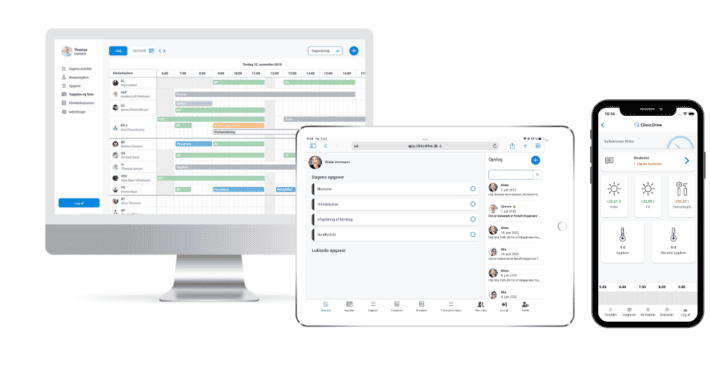
    The system is a web app that stores everything in the cloud and is always accessible from PC, tablet and mobile. Employees can log in quickly and easily, while administrators have full access and control from their PC.


    Click here to see the different features

    Feature Basic Flex
    Web app, stores everything in the cloud / always accessible – Always access the latest data – securely stored in the cloud, with no installations required.
    Tablet login at the clinic – Employees can log in directly on the clinic’s tablet – easy and fast in a busy day-to-day routine.
    Admin access from PC – Administrators can manage all functions from a PC – full overview and control wherever they are.
    Web app for mobile – Access ClinicDrive on the go – employees can record time, absence or check schedules directly from their mobile.
  • Clinic network (Add-on)

    Central management for more than 2 clinics

    (Add-on) Get access to an HQ platform from which you can manage and monitor multiple clinics under the same network. The feature enables shared month-end closing, cross-clinic communication, network roles and access management, and Best Practice sharing across the chain.


    Click here to see the different features

    Clinic network Basic Flex
    Central management for more than 2 clinics – Access to an HQ platform from which the customer can manage and monitor multiple clinics under the same network. Add-on
    Shared month-end closing – Consolidated month-end closing for payroll and HR administration across clinics. Add-on
    Cross-clinic communication – Internal messages and announcements between clinics, departments and HQ. Add-on
    Network roles and access management – Differentiated user permissions for HQ users, clinic managers and employees in the network. Add-on
    Best Practice sharing – Option to create, maintain and share best-practice documents, procedures and descriptions across clinics. Add-on

We cover all of Denmark

Become part of the future of the dental industry

Join many of your colleagues across the country

Yellow starsEasier than I had expected
“It was very exciting to get started with ClinicDrive, and easier than I had expected. If you are familiar with general use of a tablet or smartphone, there is not much difference”

Yellow starsAn invaluable tool during our visit from THE DANISH PATIENT SAFETY AUTHORITY
“They were impressed by ClinicDrive’s ability to consolidate important information individually in the system while also making it accessible to all our staff”

Yellow starsIt is a fantastic positive development
“We are seeing a trend towards increased efficiency and safety in dental practices with ClinicDrive
—it is a fantastic positive development”

Yellow starsIt is absolutely brilliant
“It is absolutely brilliant to have a single platform to keep track of, among other things, daily routines, all the clinic’s documents, and staff information.”

Yellow starsEasier than I had expected
“It was very exciting to get started with ClinicDrive, and easier than I had expected. If you are familiar with general use of a tablet or smartphone, there is not much difference”

Yellow starsAn invaluable tool during our visit from THE DANISH PATIENT SAFETY AUTHORITY
“They were impressed by ClinicDrive’s ability to consolidate important information individually in the system while also making it accessible to all our staff”

Yellow starsWe can highly recommend ClinicDrive
“Here at the clinic, we have been pleased to integrate ClinicDrive into daily use. We especially appreciate the systematisation of tasks, which makes everyday life easier, clearer, and less pressured”

Yellow starsIt is a fantastic positive development
“We are seeing a trend towards increased efficiency and safety in dental practices with ClinicDrive
—it is a fantastic positive development”

Yellow starsIt is absolutely brilliant
“It is absolutely brilliant to have a single platform to keep track of, among other things, daily routines, all the clinic’s documents, and staff information.”

Yellow starsThe very best part
“The very best part is that we have manuals for the clinic’s many tasks in the system”

Yellow starsAdministrative hours shrink
“It takes a bit of data entry at the start, but soon you are up and running, and the administrative hours shrink and become more enjoyable!”

Yellow starsA very good and informative introduction
“I have received a very good and informative introduction to the ClinicDrive solution”

How do you get started?

  • We start the journey together

    The first step is to contact us. We will then help you get started, and through our close collaboration we will set a clear direction for your system.

  • Onboarding, setup and training

    We set everything up with your clinic owner and a selected ClinicDrive administrator. After that, everyone is onboarded and properly prepared to use the system.

  • We go live with the system

    Now the system is running as it should, and everyone is trained to use ClinicDrive. After it goes live, you can always use our free support.

Write to us